
Whisper Drive
Local audio & video transcription powered by whisper.cpp — nothing leaves your computer.
Free Windows 10/11 (x64) app · v0.10.0 · no accounts, no uploads, no cloud · GPU acceleration optional.
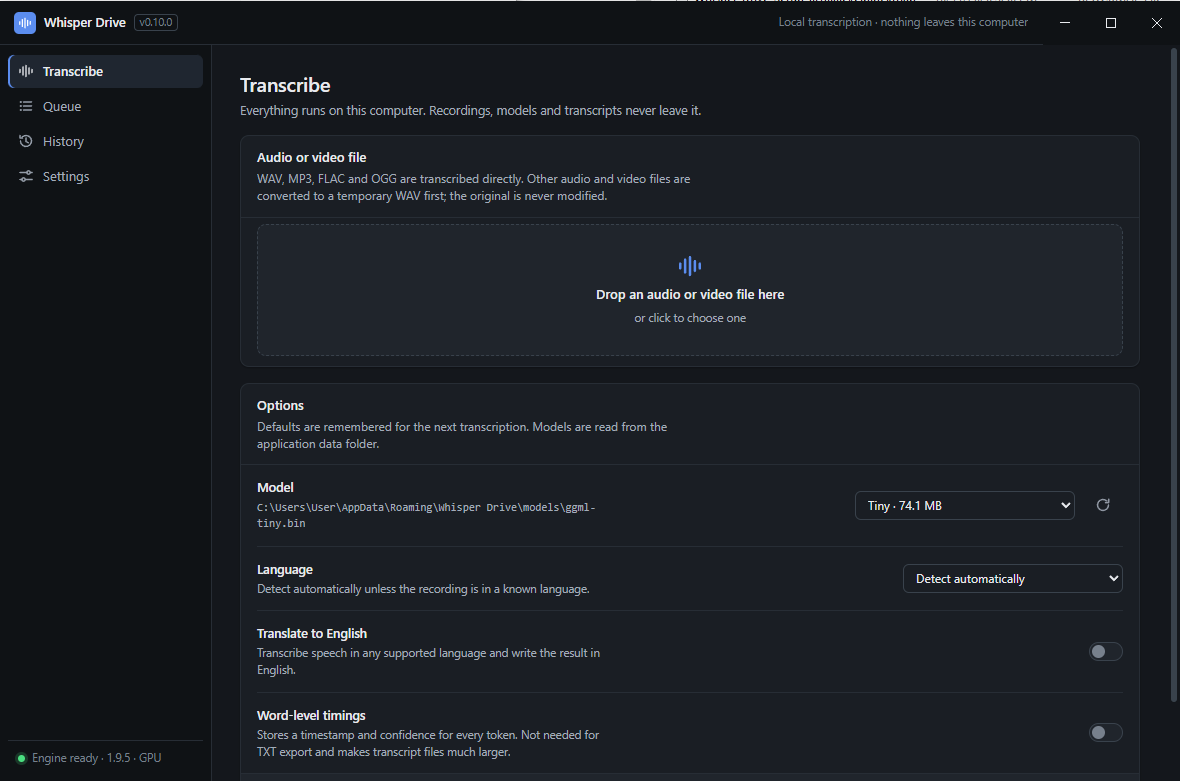
Whisper Drive turns audio and video into text using OpenAI's Whisper models via whisper.cpp — entirely on your own machine.
How it works
Drop in a recording, pick a model, and get clean, timestamped text. It reads WAV, MP3, FLAC and OGG directly, and converts anything else — M4A, MP4, MKV, MOV, WMA, OPUS and more — through a bundled FFmpeg, leaving the original file untouched. Transcripts land in a built-in editor where you can fix a word or a timestamp, then export to TXT, SRT, VTT, JSON or CSV with your own naming and formatting rules.
Private by design
It is built around one promise: your recordings, models and transcripts never leave your computer. There are no accounts, no telemetry and no cloud processing. Models are downloaded once from the official whisper.cpp repository and checksum-verified before use.
Built for batch
The interface guides a new user from install to first transcript in about a minute, and batch work is covered by a persistent queue that processes files one at a time, survives restarts, and notifies you when a batch finishes.
Download
Version 0.10.0 · Windows 10/11 x64 · Free · custom licence (free use incl. commercial). Download links will go live here when the artifacts are published.
Per-user install (no administrator rights), directory selectable.
SHA-256: 36b6a0307da50ddcfd31d02bf0b639b9adc0cba19ee53911bd5e336b90ac8f39
Runs without installation; uses the same data folder.
SHA-256: 94610e6b1746a8f87610ce009029097396946fd9066a2d261481dd76426be5b8
Updates: no auto-updater. Install a newer Setup over the old one — settings, models, transcripts and history are preserved. Uninstall removes only the application; user data in %APPDATA%\Whisper Drive is never touched.
SmartScreen: the binary is not code signed yet, so Windows may show “Windows protected your PC” on first run — choose “More info” → “Run anyway”. Code signing is planned.
Verify your download the way the app itself verifies everything it downloads:
Get-FileHash .\Whisper-Drive-Setup-0.10.0.exe -Algorithm SHA256
Features
Transcription
- Local whisper.cpp engine (v1.9.5), bundled — no engine setup required
- Language auto-detection or 90+ languages; optional translate-to-English
- Word-level timestamps (optional, per job)
- Live progress, cancellation, per-job logs
Formats & media
- Direct: WAV, MP3, FLAC, OGG
- Converted via bundled FFmpeg: M4A, AAC, WMA, Opus, AIFF, AMR, MKA and video containers MP4, MKV, MOV, AVI, WEBM, WMV, MPEG, TS, 3GP and others
- Originals are only read, never modified; temporary conversions are deleted when the job ends
Editing & exports
- Segment-level text and timestamp editing (millisecond precision)
- Original transcript always preserved; edits stored separately and reversible
- Export to TXT, SRT, VTT, JSON, CSV — individually or all at once
- Filename templates (
{name},{date},{model}, …); nothing is ever overwritten (duplicates become “name (2)”) - Re-export any past job with current preferences
Batch queue
- Add many files at once, drag and drop included
- Sequential processing, pause/resume, cancel, retry, duplicate detection
- Survives restarts: interrupted jobs are recoverable, never silently marked complete
Hardware & performance
- CPU out of the box; NVIDIA GPU acceleration optional via a verified engine pack (~705 MB, downloaded and checksum-verified in-app)
- Reference timings (Ryzen 9 3950X / RTX 3090, 110 s of audio): tiny 6.3 s → 2.1 s, base 12.8 s → 2.7 s, small 40.8 s → 4.0 s (CPU → CUDA)
History
- Searchable record of every completed job (file name, model, language, date)
- Per-job details: transcript preview, model/language metadata, on-disk file status
- Removing an entry never touches files; deleting stored transcripts is a separate, clearly labelled destructive action
Desktop experience
- Guided first-run flow: component check, model guidance, optional first test transcription
- Light/dark/system themes, custom title bar, keyboard navigation (Ctrl+1–4)
- Desktop notifications for completions and failures (suppressed while you are looking at the app)
System requirements
| Minimum | Notes | |
|---|---|---|
| OS | Windows 10 x64 (19045+) / Windows 11 | |
| CPU | x64 with SSE4.2 | More cores help CPU transcription |
| RAM | 4 GB | 8 GB+ for medium/large models |
| Disk | ~500 MB free + model sizes | Models: Tiny 75 MB, Base 148 MB, Small 488 MB, Medium 1.5 GB, Large v3 1.6 GB (quantised variants smaller) |
| GPU | None required | Optional: NVIDIA with CUDA 11.8 support, driver 452.39+ (engine pack ~705 MB, downloaded in-app) |
| Internet | Only for downloads | App, models and the optional GPU pack; transcription itself is always offline |
Privacy
Whisper Drive is local-first by design. Audio, video, models, transcripts, edits, history and settings live on your computer. Transcription runs entirely offline. The application makes no analytics or telemetry requests and has no accounts. The only network traffic is downloads you initiate: models from the official whisper.cpp repository and the optional GPU engine pack from its publishers — each verified against published checksums before use.
Licence
Whisper Drive is free to use for any purpose, including commercial and business use. You may modify it for your own use. Redistribution requires prior written permission ([email protected]). If you offer it to others as a service, include a visible credit: “This service uses Whisper Drive — © 2026 Mana — moddedmana.com/whisper-drive”.
Recordings, transcripts, edits and exports you create are yours; the licence makes no claim on your content.
Bundled third-party components keep their own licences: whisper.cpp (MIT), FFmpeg (GPL v3, invoked as a separate process; licence text shipped beside the executable), and NVIDIA CUDA components in the optional GPU pack. Full details ship with every install: LICENSE and THIRD-PARTY-NOTICES.md.
This section is a plain-language summary, not the full legal text — the complete licence ships with every install (LICENSE) and that full text is the version that governs.
FAQ
Is it really offline?
Yes — transcription never touches the network. Downloads (models, optional GPU pack) are the only traffic.
Do I need a GPU?
No. The CPU engine is bundled and fully functional; GPU acceleration is an optional speed-up.
Is it free for commercial/work use?
Yes. The only restriction is redistribution of the software itself.
Which model should I pick?
Start with Tiny (fastest). Base is a good middle ground; Small is the most accurate of the quick models. Try the smallest that is accurate enough — the first-run screen explains the trade-offs.
Where do my files go?
Everything lives in %APPDATA%\Whisper Drive; exports are written next to each recording or to a folder you choose.
Why does SmartScreen warn me?
The build is not code signed yet. The checksums published on this page let you verify the download.
How do I update?
Download the new installer and run it — your data is preserved automatically.